Blog · Updated September 9, 2026
Federal Resume Template: Fill In and Tailor for USAJOBS
Copy this federal resume template, fill every work entry, tailor it to one announcement, then check your two-page file and all required attachments.
Use a federal resume template to give reviewers the facts they need to credit your experience for one job announcement. Add your contact details, repeat the full work-entry block for each relevant role, then use the remaining space for education, credentials, and other experience that supports your qualifications.
Copy this federal resume template
Use the example below as a model for your draft. USAJOBS lists the main fields for each work entry. Guides from the University of Tampa, the National Archives and Records Administration, the Department of the Interior, and the IRS show how to arrange those fields in a complete resume.
Example federal resume
Fictional one-page Word sample
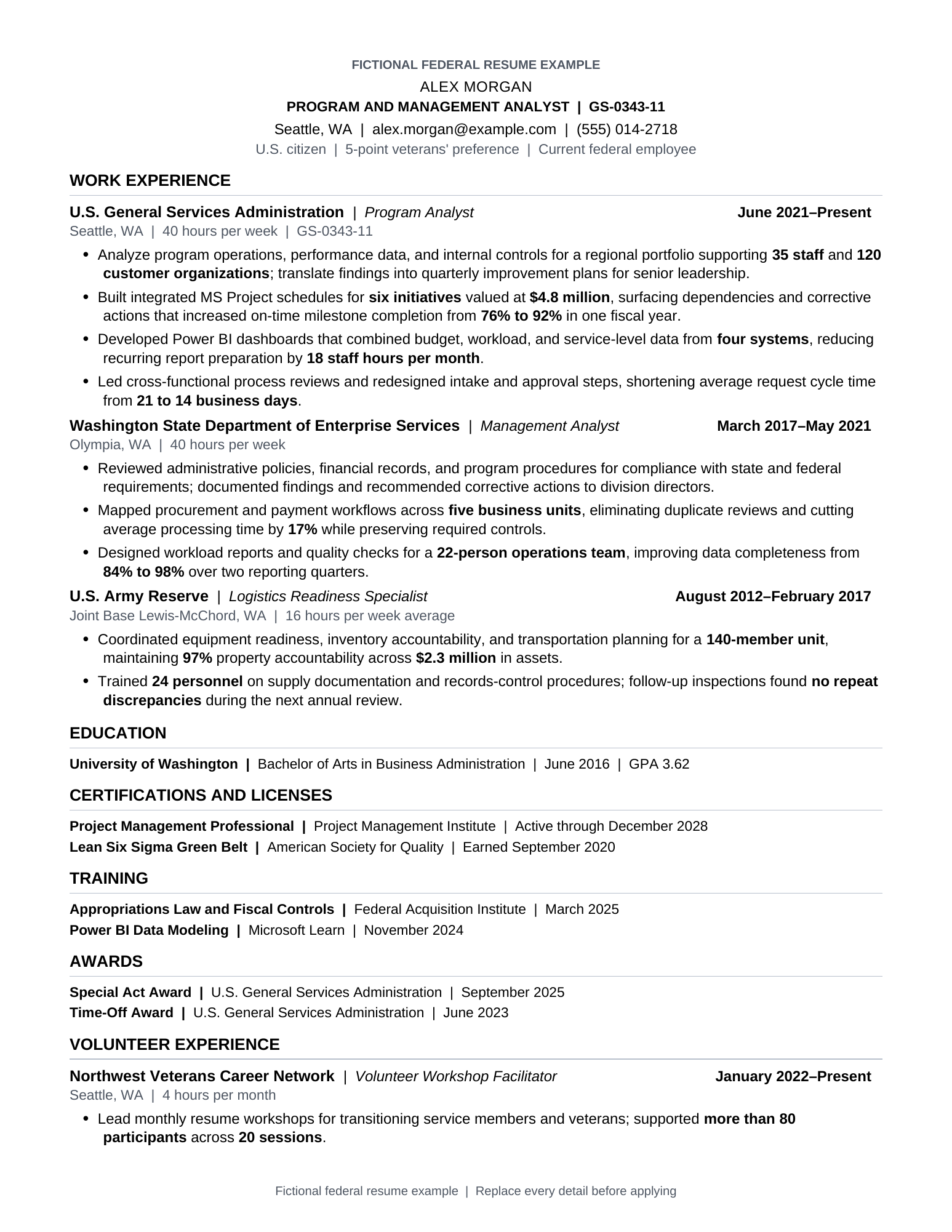
See dates, hours per week, federal series and grade, relevant duties, and results in context.
USAJOBS says every relevant work entry should list the job title, employer, start and end dates by month and year, hours per week, and federal series and grade when applicable. Add brief duty descriptions that show you can perform the listed tasks at the required level. Dates and weekly hours show how much experience you have. Series and grade add context for federal work.
Choose the section order that fits your experience unless the announcement or application form says otherwise. The National Archives guide says experienced applicants often put work before education, while recent graduates may put education first. Resume Builder also places experience first.
Decide which resume instruction controls
Use this order when federal resume instructions conflict.
- Current policy and USAJOBS requirements: OPM sets the two-page policy for covered Title 5 announcements, and USAJOBS lists the fields expected in each work entry. Apply both as requirements within their stated scope.
- The specific announcement or named agency: The announcement identifies the qualifications, education, assessments, and separate documents for that opening. Agency guides may also request or recommend extra fields, such as supervisor information.
- Readability preferences: When the announcement gives no direction, you can adjust bullets, section order, spacing, and other layout choices. Follow a named agency preference when applying there. Otherwise, choose the clearest supported option.
Apply current OPM and USAJOBS rules within their stated scope, then follow the live announcement. Use agency or career-center guidance for the remaining readability choices.
Tailor every work entry to the announcement
USAJOBS tells applicants to read the announcement closely and show how their education, skills, and experience meet its requirements. Review the Duties and Requirements sections, including Qualifications, Specialized experience, and Education. Also review How You Will Be Evaluated, How to Apply, and Required Documents for instructions that affect the full application.
For each qualification you actually meet, identify the job entry that proves it. Use the same term as the announcement when it accurately describes your work, then explain what you did, at what level, and with what result. Do not leave a key skill only in the summary and expect the reviewer to infer where you used it.
USAJOBS gives a simple example involving MS Project. If that named tool appears in a qualification and you used it, write MS Project instead of the vague phrase scheduling software. A fill-in line could read: Used MS Project to [build or maintain] schedules for [program scope], coordinate [teams or milestones], and achieve [verified result]. Keep the brackets until you can replace them with facts from your record.
Your resume should also stay consistent with any assessment responses. NIH guidance says the experience in the resume should support and match the answers in the assessment questionnaire. That is an agency-published instruction, not a claim that every agency uses the same scoring process.
Turn duty lists into evidence of results
USAJOBS recommends concise, results-focused language, with numbers, percentages, dollars, or descriptive measures when available. The National Archives guide gives a useful pattern: state the accomplishment, add the measure, then explain the action that produced it.
A duty-only line might say: Managed purchase requests.
A stronger fill-in line is: Processed [number] purchase requests worth [dollar amount] across [number] offices, reducing [backlog, errors, or cycle time] by [verified amount] through [specific action].
Add enough context to show your level of responsibility. The Department of the Interior advises applicants to say whether they were a team member or team lead and to give examples of work at the required level. When a number is unavailable or sensitive, describe scope through the program, audience, complexity, frequency, or outcome. Never invent a metric.
Fit the current two-page limit and keep the layout readable
OPM's current two-page limit applies to internal and external competitive and excepted service announcements under Title 5, whether posted on USAJOBS or another platform. USAJOBS also says applicants cannot upload or build a resume longer than two pages. This is a scoped policy for covered federal applications.
OPM gives separate instructions for non-Title 5 agencies and the judicial or legislative branches. If one of these employers accepts a longer resume, the announcement must explain how to submit it through the other-documents route. Use that route only when the announcement provides those instructions.
Older guides explain why you may still see different limits. A May 2025 IRS publication recommended 3-5 pages, older Air Force training used a 3-5 page maximum, and a University of Tampa guide described a 2-5 page range. Their advice on fields and layout may still help, but the current OPM rule controls covered applications.
The guidance does not set a fixed length for each job entry. USAJOBS advises applicants to focus on recent, relevant experience and remove or give less space to outdated or unrelated material. Give the most space to roles that prove the target qualifications.
Bullets are a readability choice unless the announcement says otherwise. The IRS guide allows paragraphs or bullets, while NIH recommends bullets because they are easier to read. National Archives and Air Force examples also favor bullets. Short bullets are a practical choice, and the IRS guide also allows concise paragraphs.
Choose Resume Builder or an uploaded file
Use the current announcement and application flow to choose Resume Builder or an uploaded file. Both routes share the USAJOBS two-page limit. USAJOBS says its builder can start with information from your profile and help create a resume that follows its recommendations. NIH encourages Resume Builder and also gives instructions for applicants who upload their own document. The University of Tampa guide notes that some postings allow an upload and others require Resume Builder.
For an uploaded file, USAJOBS recommends PDF to preserve formatting and page count. It also recommends a standard 8.5-by-11-inch page, 0.5-inch margins, a readable sans-serif font, 14-point titles, and 10-point main text. These are USAJOBS recommendations, not universal formatting prohibitions. The National Archives recommends readable 10-12 point type and margins between 0.5 and 1 inch. The Department of Labor calls for consistent headings, suitable white space, and overall readability.
Use plain language and spell out unfamiliar acronyms. The IRS guide says to avoid graphics, italics, underlining, shadows, reversed text, and all-capital content. Those are named IRS instructions, not a rule attributed here to every federal employer.
Include education, licenses, and certifications when they help establish a required qualification. USAJOBS says education entries should list the institution, degree type, completion date, and GPA. It also directs applicants to submit required transcript, certification, or license files separately. Relevant volunteer work can also show qualifications. Department of the Interior guidance says to give it the same core details as paid experience.
Keep a comprehensive source resume outside the application, as the National Archives suggests. Copy and trim it for each two-page submission. If you are also considering an outside move, paste the same verified duty and accomplishment details into FedUp.work to see which private-sector roles fit that experience. Then return to the announcement and finish the federal application.
For related research, see the federal employee salary lookup guide and job matching for federal workers.
Is your resume ready for this announcement?
- Save the target announcement
Save one announcement and create a target list. Include its qualifications, specialized experience, education, evaluation criteria, assessments, application instructions, and required documents.
- Separate rules from preferences
Label each note as USAJOBS or OPM guidance, an agency or announcement instruction, or a readability choice you can adapt. Keep the source beside each note.
- Confirm the submission route
USAJOBS limits both Resume Builder and uploaded resumes to two pages. Check How to Apply and Required Documents, then add the accepted route and page limit to your target list.
- Build the resume outline
Set up sections for contact information, work experience, education, licenses, and certifications. Add any relevant optional sections to complete the fill-in outline.
- Complete every work entry
For each role, list the title, employer, start and end dates by month/year, and weekly hours. Add series and grade for federal roles so every work-entry header is complete.
- Match experience to qualifications
Find truthful evidence in your work history for every qualification and specialized experience item you meet. Add a supporting line where reviewers can see it.
- Show scope and results
Follow the announcement's instructions first. If it gives no format, the IRS allows bullets or paragraphs, while NIH recommends bullets. Keep each entry consistent and focused on results, using measures when available.
- Add credentials and documents
List required education, licenses, and certifications in the resume. Collect every file named in Required Documents, then check that the full attachment set is ready.
- Support assessment responses
Compare the resume with the evaluation criteria and assessment responses. In your assessment notes, link each response to the resume line that truthfully supports it.
- Run the final file check
Proofread the resume, then confirm the USAJOBS file is legible, two pages or less, and under 5 MB. Reopen every attachment before saving the complete package.
Sources and further reading
Let's get back to work.
Preview private-sector roles that value government experience. Create an account when you want personalized matching.